



There is one mistake that keeps happening when someone tries to preserve digital evidence published on social media: acting too late.
The problem is not taking a bad screenshot of the post content. It is not the image quality. The real problem is that by the time you finally decide to act, the story has already disappeared, the video has been deleted, the comment has been edited, or the profile no longer exists.
On the internet, just a few hours can be enough for any publication to disappear forever.
As soon as you detect a publication that could serve as evidence — fraud, harassment, or a breach of agreement — we recommend acting immediately and preserving it, even if you still do not know whether you will end up needing that content. As the saying goes, “better safe than sorry.”
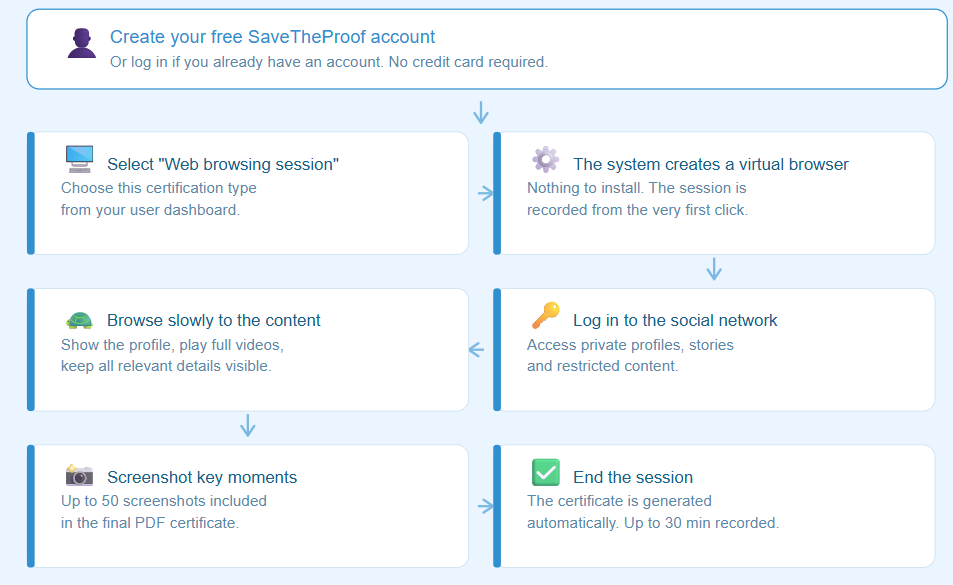
Next, we show you the step-by-step process we recommend at SaveTheProof to certify social media posts with legal validity before they disappear.
What to Do to Certify Social Media Posts Step by Step
“I’ll do it later” is the number one cause of lost evidence.
Be especially careful with stories and live streams, which disappear automatically; with profiles that can be deleted overnight; and with comments or posts that the author can edit or remove at any moment.
If something seems relevant to you, do not wait.
An isolated image of a comment is usually not enough.
What really matters is the whole context: the complete profile, the username, the URL, the comments, the visible date, and how you reached that content.
Very often, the context is just as important as the publication itself.
If there is a video, it must be played completely, with the profile visible and with the entire navigation process recorded.
A partial screenshot or a cut video can make the evidence lose validity. You need the full content.
Many social media posts are only visible when logged in or are restricted to followers.
Before accessing and logging into your account, close other active sessions on mobile devices or computers. Some platforms detect simultaneous logins from different locations and may block access, request additional verification, or log you out without warning.
Once verified, with SaveTheProof’s Web Browsing Session certification, you can log in from the virtual browser and access restricted content.
Scrolling too quickly or jumping between pages is a common mistake.
Navigation must be clear and steady: pause for a few seconds on each relevant piece of content, keep important elements visible, and avoid abrupt scrolling.
The clearer and more complete the recording is, the more useful it will be as evidence.
Even though the web browsing session is recorded on video, it is still worth taking specific screenshots of important posts, comments, profiles, or messages. Using the buttons on the left side of the screen, you can capture the visible area or the full page:
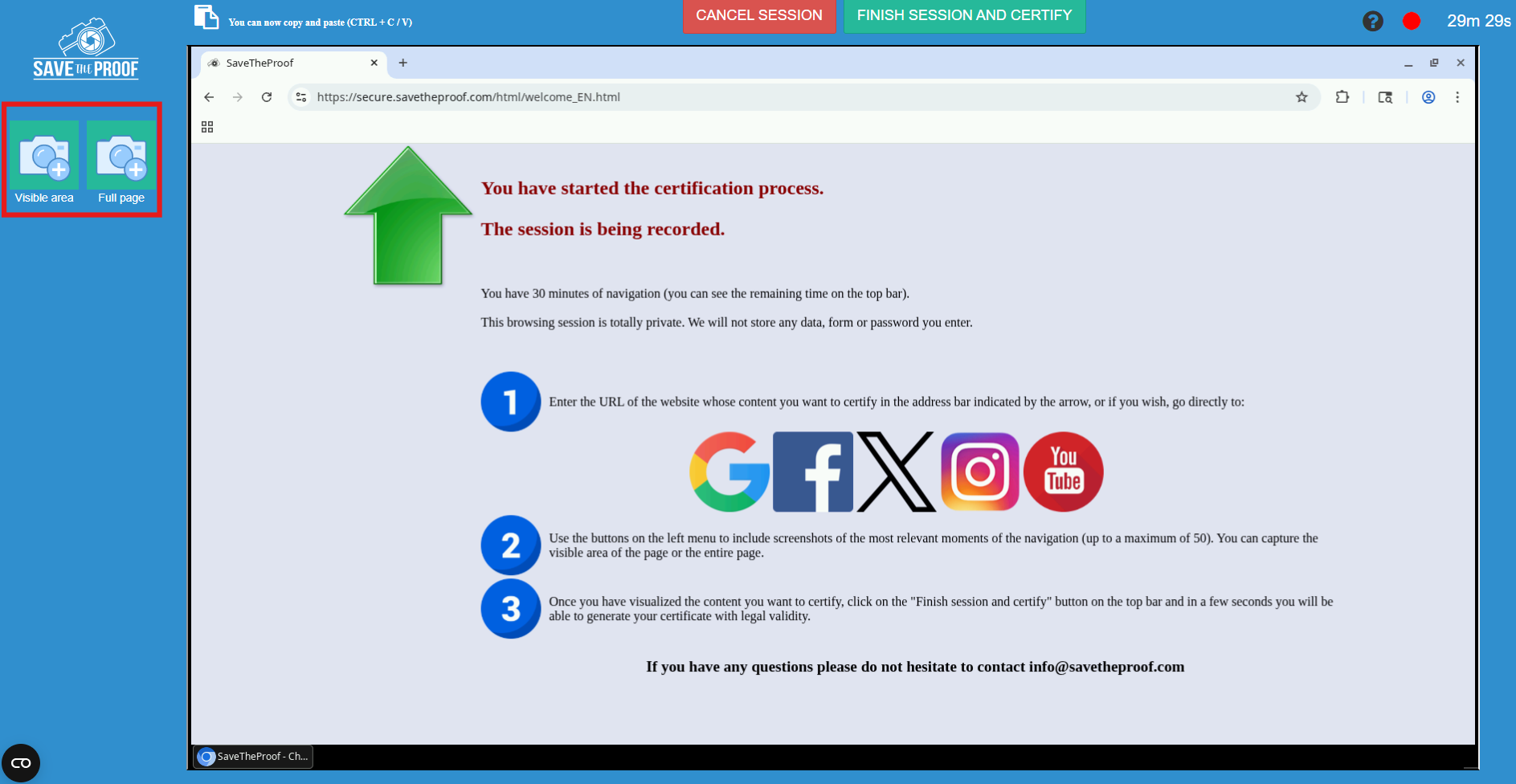
With SaveTheProof, you can include up to 50 screenshots within the certificate.
Once generated, the certificate will be available in your SaveTheProof profile with unlimited downloads.
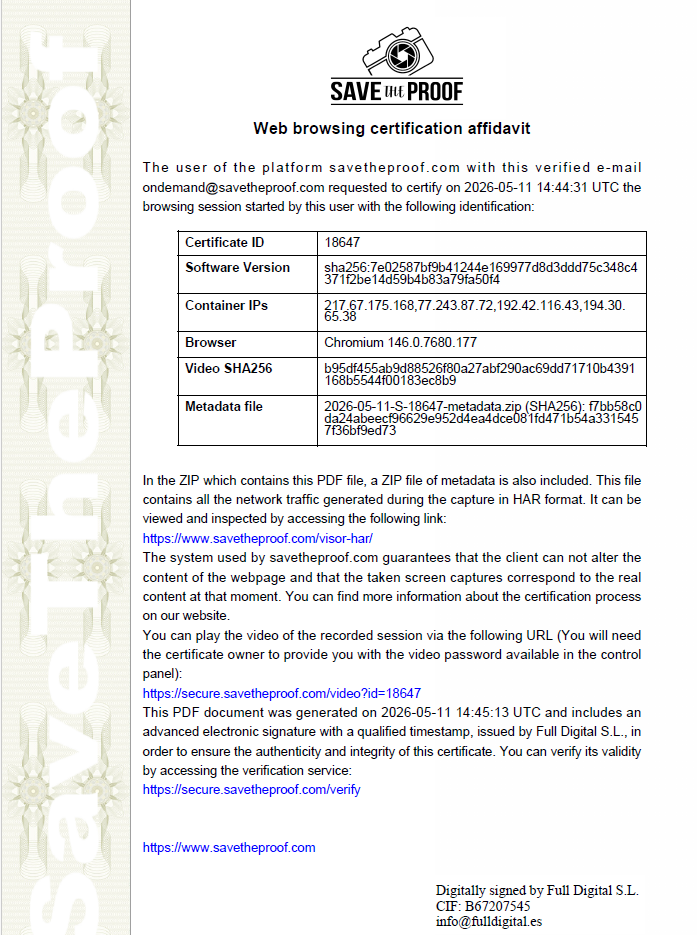
If you need to present it as evidence, the PDF Certificate is the main document:
- It includes the email address of the user who requested it,
- The date and a unique certification identifier,
- The SHA256 hashes of the software used and the navigation video,
- The IP address of the server from which the session was generated,
- The version of the virtual browser and a password-protected URL to view the recording.
- Everything is electronically signed with advanced LTV signature and a qualified timestamp in compliance with eIDAS. This last element — the qualified timestamp — is what gives it legal validity before a judge, since it verifiably proves that the content existed at the exact time of certification.
Here you can see an example of a Web Browsing Session Certificate:
Along with the PDF, you will also receive a ZIP folder containing the technical files: the complete network traffic in HAR format, the TSQ and TSR timestamp files for both the video and the HAR, and the SHA256 hash of the video.
These files may be requested by digital forensic experts or by the court, so it is advisable to keep a backup copy.
If you need to know exactly how to present it, we explain the complete process in this post: How to submit a SaveTheProof certificate in legal proceedings.
What you should NOT do when certifying social media posts
⚠️ Isolated and cropped screenshot.
Without context, navigation, or continuity in time, a single image may not be enough.
⚠️ Waiting until “there is more evidence.”
The content may disappear before that happens.
⚠️ Hiding parts of the navigation.
Jumping between windows or cutting parts of the process creates doubts about the integrity of the evidence.
⚠️ Editing screenshots afterward.
Cropping, marking, or modifying files can compromise the validity of the entire evidence.

Situations where time works against you
There are certain types of social media posts that tend to disappear very quickly. In these cases, acting immediately is especially important to avoid losing the evidence.
⏱️ Stories, live streams, and ephemeral content.
Stories and many temporary contents may disappear in just 24 hours or become unavailable quickly, greatly reducing the time available to preserve the evidence.
🚨 Harassment or threats.
When content generates conflict or complaints, it is common for the author to remove it quickly.
💸 Fraud and scams.
Fraudulent profiles are often modified, disappear, or get removed shortly afterward.
💼 Workplace disputes.
In situations such as sick leave abuse, unfair competition, contractual breaches, or improper use of social media, posts and messages may be edited or deleted quickly once the person becomes aware of a claim or investigation.
👤 Identity impersonation.
Fake profiles may disappear after user reports or actions taken by the platform itself.
The sooner you preserve the publication and its context, the more information you will be able to keep and the lower the risk that it disappears.
Do you have questions? Write to us at [email protected] or use the website chat. We will be happy to help you. 😉